> For the complete documentation index, see [llms.txt](https://capcap-1.gitbook.io/capcap/llms.txt). Markdown versions of documentation pages are available by appending `.md` to page URLs; this page is available as [Markdown](https://capcap-1.gitbook.io/capcap/readme/ctf-modules/information-gathering/web-enumeration/sub-domain-vhost-enumeration.md).
# Sub Domain/Vhost Enumeration
Subdomains extend the main domain and often expose separate applications or services.
Examples include `blog.example.com`, `shop.example.com`, and `mail.example.com`.
### Why subdomains matter
Subdomains often expose assets that are not linked from the main site.
Common examples:
* `Development and Staging Environments` — may run weaker controls or older code
* `Hidden Login Portals` — may expose admin panels or internal access points
* `Legacy Applications` — may still run outdated and vulnerable software
* `Sensitive Information` — may expose files, data, or configuration details
### Subdomain enumeration
`Subdomain enumeration` is the process of identifying and listing subdomains for a target domain.
From a DNS perspective, subdomains are usually represented by `A` or `AAAA` records. They may also use `CNAME` records to point to other hosts.
There are two main approaches.
#### Active subdomain enumeration
This approach interacts directly with the target's DNS infrastructure.
One method is a `DNS zone transfer`. A misconfigured server may expose the full zone. This is uncommon, but still worth testing when allowed.
Another common method is `brute-force enumeration`. This tests a list of possible names against the target domain. Tools such as `dnsenum`, `ffuf`, and `gobuster` automate this process with common or custom wordlists.
#### Passive subdomain enumeration
This approach uses external data sources and avoids direct interaction with the target's DNS servers.
Useful sources include:
* `Certificate Transparency (CT) logs` — certificates often list subdomains in the SAN field
* `Search engines` — operators such as `site:` can reveal indexed subdomains
* `Online DNS databases` — many services aggregate DNS data from multiple sources
Passive methods are quieter. Active methods are usually more complete. Combining both gives better coverage.
### Subdomain brute-forcing
`Subdomain brute-force enumeration` tests pre-defined names against the target domain to find valid subdomains.
This usually follows four steps:
1. `Wordlist selection`
* `General-purpose` — common names such as `dev`, `staging`, `blog`, `mail`, `admin`, and `test`
* `Targeted` — names based on the target's industry, stack, or naming patterns
* `Custom` — names built from intelligence gathered during recon
2. `Iteration and querying`
* Append each word to the root domain, such as `dev.example.com`
3. `DNS lookup`
* Query each candidate and check whether it resolves
4. `Filtering and validation`
* Keep valid results and confirm whether the host is live or useful
### Common tools
| Tool | Description |
| ------------------------------------------------------- | ----------------------------------------------------------- |
| [dnsenum](https://github.com/fwaeytens/dnsenum) | Comprehensive DNS enumeration tool with brute-force support |
| [fierce](https://github.com/mschwager/fierce) | Recursive subdomain discovery with wildcard detection |
| [dnsrecon](https://github.com/darkoperator/dnsrecon) | DNS reconnaissance with multiple discovery modes |
| [amass](https://github.com/owasp-amass/amass) | Broad subdomain discovery with strong data source coverage |
| [assetfinder](https://github.com/tomnomnom/assetfinder) | Lightweight subdomain discovery tool |
| [puredns](https://github.com/d3mondev/puredns) | Fast brute-force resolution and filtering |
### DNSEnum
`dnsenum` is a command-line tool written in Perl for DNS reconnaissance and subdomain discovery.
Key functions include:
* `DNS Record Enumeration` — retrieves records such as `A`, `AAAA`, `NS`, `MX`, and `TXT`
* `Zone Transfer Attempts` — tests discovered name servers for `AXFR`
* `Subdomain Brute-Forcing` — tests candidate names from a wordlist
* `Google Scraping` — looks for subdomains indexed in search results
* `Reverse Lookup` — finds domains associated with an IP address
* `WHOIS Lookups` — gathers registration and ownership details
This example enumerates subdomains for `inlanefreight.com` with a SecLists wordlist:
```bash
dnsenum --enum inlanefreight.com -f /usr/share/seclists/Discovery/DNS/subdomains-top1million-20000.txt -r
```
Command breakdown:
* `dnsenum --enum inlanefreight.com` — sets the target domain and enables common enumeration options
* `-f /usr/share/seclists/Discovery/DNS/subdomains-top1million-20000.txt` — uses the SecLists wordlist for brute force
* `-r` — enables recursive brute forcing against discovered subdomains
Example output:
```shell
impale7@htb[/htb]$ dnsenum --enum inlanefreight.com -f /usr/share/seclists/Discovery/DNS/subdomains-top1million-20000.txt
dnsenum VERSION:1.2.6
----- inlanefreight.com -----
Host's addresses:
__________________
inlanefreight.com. 300 IN A 134.209.24.248
[...]
Brute forcing with /usr/share/seclists/Discovery/DNS/subdomains-top1million-20000.txt:
_______________________________________________________________________________________
www.inlanefreight.com. 300 IN A 134.209.24.248
support.inlanefreight.com. 300 IN A 134.209.24.248
[...]
done.
```
### DNS zone transfers
Brute forcing works well, but `AXFR` is faster when it is exposed.
A DNS zone transfer replicates records between name servers. If it is misconfigured, you may get the full zone file in one request.
### What a zone transfer is
A zone transfer is a full copy of the records in a DNS zone.
Authoritative servers use it to keep primary and secondary servers in sync. If access controls are loose, an unauthorized client can pull the same data.
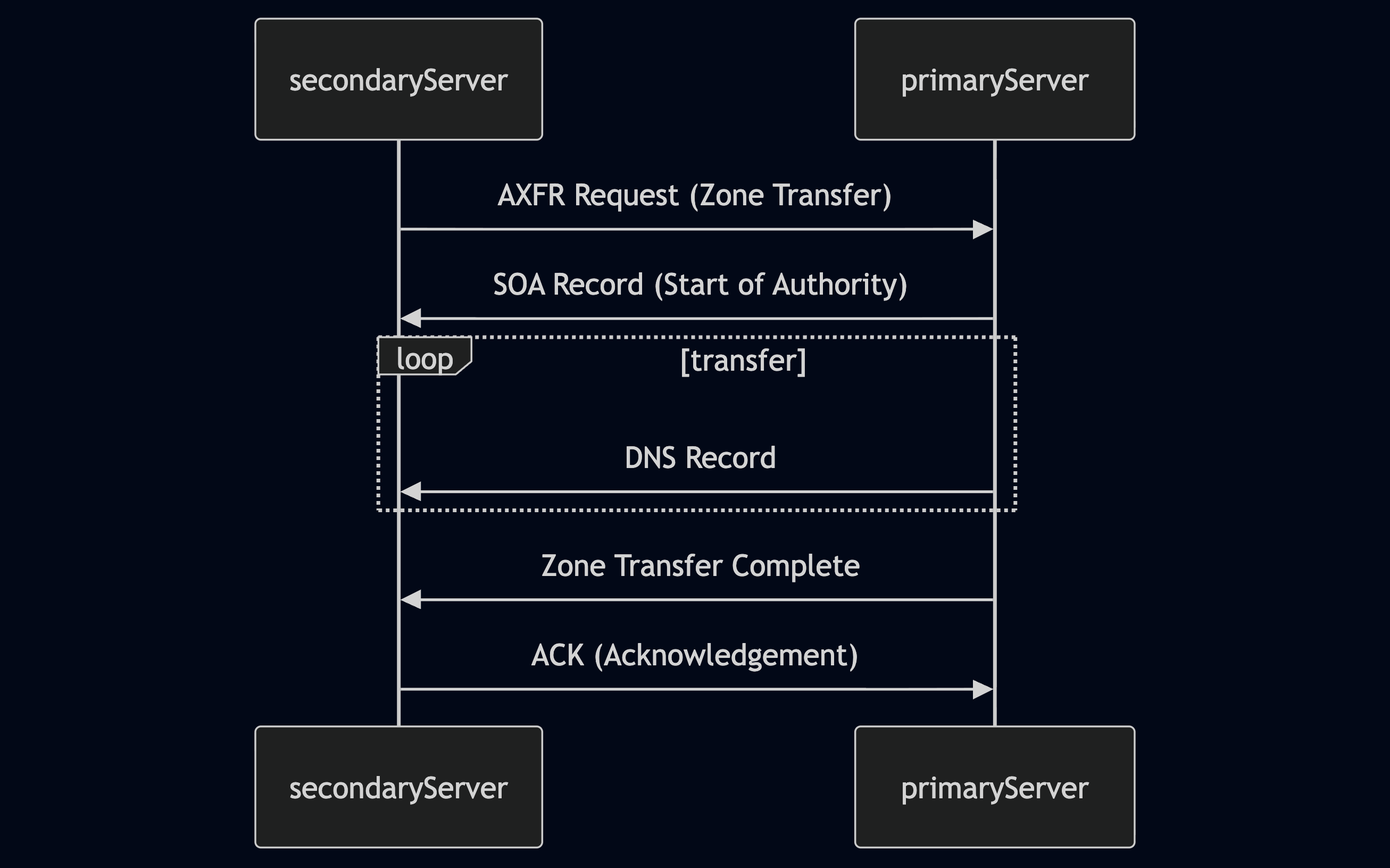
Typical flow:
1. **AXFR request** — the secondary server requests a full transfer.
2. **SOA record** — the primary server returns the zone authority details.
3. **Record transfer** — the server sends records such as `A`, `AAAA`, `MX`, `CNAME`, and `NS`.
4. **Transfer complete** — the server signals the end of the transfer.
5. **Acknowledgment** — the secondary server confirms receipt.
### Why misconfigured transfers matter
Zone transfers are normal for DNS operations. The risk comes from weak access controls.
If any client can request `AXFR`, the server may disclose the entire zone. That gives you a high-value map of the target infrastructure.
Useful data often includes:
* `Subdomains` — hidden apps, staging hosts, admin panels, and internal naming patterns
* `IP addresses` — direct targets for scanning and service validation
* `Name server records` — authoritative infrastructure and possible hosting clues
#### Remediation
Modern DNS servers should allow transfers only to trusted secondary servers.
Misconfigurations still happen. That is why testing `AXFR` remains worth a quick check when scope allows.
{% hint style="warning" %}
Attempt zone transfers only when you have authorization.
{% endhint %}
### Testing with `dig`
Use `dig` to request a zone transfer from an authoritative server:
```bash
dig axfr @nsztm1.digi.ninja zonetransfer.me
```
This requests a full zone transfer for `zonetransfer.me` from `nsztm1.digi.ninja`.
If the server allows it, `dig` returns the full set of DNS records, including subdomains.
Example output:
```shell
impale7@htb[/htb]$ dig axfr @nsztm1.digi.ninja zonetransfer.me
; <<>> DiG 9.18.12-1~bpo11+1-Debian <<>> axfr @nsztm1.digi.ninja zonetransfer.me
; (1 server found)
;; global options: +cmd
zonetransfer.me. 7200 IN SOA nsztm1.digi.ninja. robin.digi.ninja. 2019100801 172800 900 1209600 3600
zonetransfer.me. 300 IN HINFO "Casio fx-700G" "Windows XP"
zonetransfer.me. 301 IN TXT "google-site-verification=tyP28J7JAUHA9fw2sHXMgcCC0I6XBmmoVi04VlMewxA"
zonetransfer.me. 7200 IN MX 0 ASPMX.L.GOOGLE.COM.
...
zonetransfer.me. 7200 IN A 5.196.105.14
zonetransfer.me. 7200 IN NS nsztm1.digi.ninja.
zonetransfer.me. 7200 IN NS nsztm2.digi.ninja.
_acme-challenge.zonetransfer.me. 301 IN TXT "6Oa05hbUJ9xSsvYy7pApQvwCUSSGgxvrbdizjePEsZI"
_sip._tcp.zonetransfer.me. 14000 IN SRV 0 0 5060 www.zonetransfer.me.
14.105.196.5.IN-ADDR.ARPA.zonetransfer.me. 7200 IN PTR www.zonetransfer.me.
asfdbauthdns.zonetransfer.me. 7900 IN AFSDB 1 asfdbbox.zonetransfer.me.
asfdbbox.zonetransfer.me. 7200 IN A 127.0.0.1
asfdbvolume.zonetransfer.me. 7800 IN AFSDB 1 asfdbbox.zonetransfer.me.
canberra-office.zonetransfer.me. 7200 IN A 202.14.81.230
...
;; Query time: 10 msec
;; SERVER: 81.4.108.41#53(nsztm1.digi.ninja) (TCP)
;; WHEN: Mon May 27 18:31:35 BST 2024
;; XFR size: 50 records (messages 1, bytes 2085)
```
\
Virtual Hosts
***
Once DNS sends traffic to the right IP, the web server decides what content to serve.
That decision often depends on `virtual hosts`, or `VHosts`.
### Why virtual hosts matter
One server can host many sites or apps.
The server uses the request details to decide which one to return.
This matters during recon because a target may expose:
* hidden apps
* admin panels
* staging sites
* internal-only names
### VHosts vs subdomains
These terms overlap, but they are not the same.
* `Subdomain` — a DNS name under a parent domain, such as `blog.example.com`
* `VHost` — a web server config that maps a hostname to content
Key point:
* a subdomain usually has a DNS record
* a VHost may exist even without public DNS
If a VHost has no DNS record, you can still test it by sending the right `Host` header or by adding it to your local `hosts` file.
{% hint style="info" %}
No DNS record does not mean no website.
{% endhint %}
### How virtual host routing works
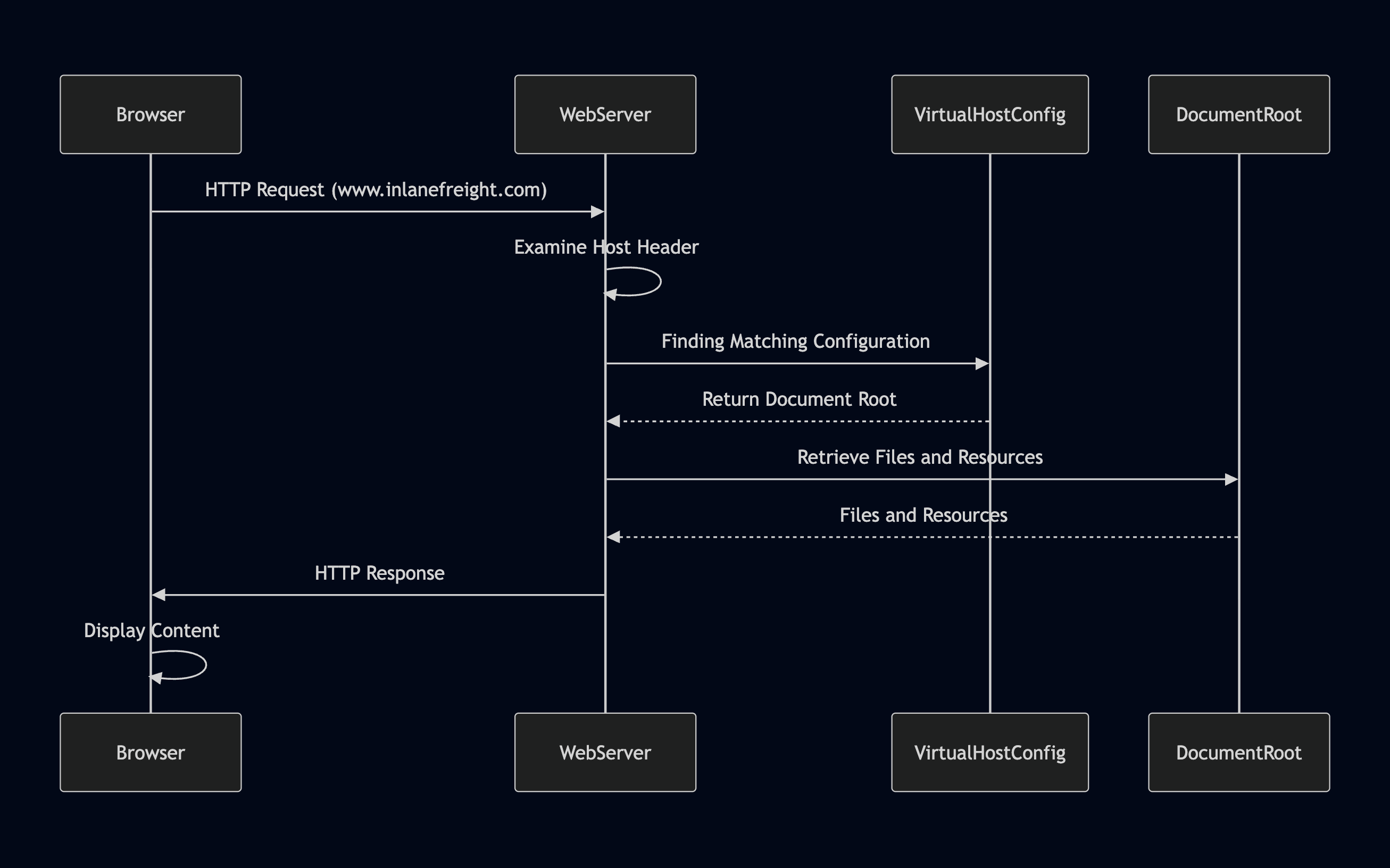
At the core of virtual hosting is the `Host` header.
The browser sends it with every HTTP request. The web server reads it and picks the matching site config.
Typical flow:
1. You request `http://target`.
2. The request includes a `Host` header, such as `admin.example.com`.
3. The server checks its virtual host configuration.
4. If a match exists, it serves that site's document root.
5. If no match exists, it serves the default site or returns an error.
### Example virtual host config
Different hostnames can point to different content on the same server.
```apache
# Example of name-based virtual host configuration in Apache
ServerName www.example1.com
DocumentRoot /var/www/example1
ServerName www.example2.org
DocumentRoot /var/www/example2
ServerName www.another-example.net
DocumentRoot /var/www/another-example
```
The server uses the `Host` header to decide which block applies.
### Types of virtual hosting
#### Name-based hosting
This is the most common model.
The server uses the `Host` header to distinguish sites on the same IP.
Why it matters:
* easy to deploy
* cost-effective
* common in real targets
#### IP-based hosting
Each site gets its own IP address.
The server chooses content based on the destination IP instead of the hostname.
Why it matters:
* stronger separation
* works without hostname matching
* less common due to IP usage
#### Port-based hosting
Each site listens on a different port.
Examples include `:80`, `:8080`, or `:8443`.
Why it matters:
* useful when hostnames are not enough
* less user-friendly
* easy to miss if you only check standard ports
### Why VHost fuzzing works
A target may host sites that:
* are not linked anywhere
* do not appear in public DNS
* resolve only inside the target network
You can still discover them by sending different `Host` headers to a known IP.
This is usually called `VHost fuzzing`.
### Common tools
| Tool | Best use |
| ---------------------------------------------------- | -------------------------------------------------------- |
| [gobuster](https://github.com/OJ/gobuster) | Fast VHost brute force with simple flags |
| [ffuf](https://github.com/ffuf/ffuf) | Flexible header fuzzing and response filtering |
| [Feroxbuster](https://github.com/epi052/feroxbuster) | Fast discovery with strong filtering and wildcard checks |
### Fast VHost workflow
{% stepper %}
{% step %}
### Identify the target
Start with a live web server IP or a base domain that resolves.
You need a reachable target first.
{% endstep %}
{% step %}
### Prepare candidate names
Use a wordlist with names such as:
* `dev`
* `admin`
* `staging`
* `test`
* `api`
Add custom names from recon when possible.
{% endstep %}
{% step %}
### Fuzz the `Host` header
Send requests to the target IP with different hostnames.
Look for unique responses by:
* status code
* body length
* title
* redirect target
{% endstep %}
{% step %}
### Validate findings
Retest interesting hits manually.
Add them to your `hosts` file if you want to browse them directly.
{% endstep %}
{% endstepper %}
### `gobuster` for VHosts
`gobuster` is one of the fastest ways to brute force virtual hosts.
Basic syntax:
```bash
gobuster vhost -u http:// -w --append-domain
```
Important flags:
* `-u` — target URL or IP
* `-w` — wordlist path
* `--append-domain` — appends the base domain to each candidate
* `-t` — thread count
* `-k` — ignore TLS certificate errors
* `-o` — save output to a file
In newer `gobuster` versions, `--append-domain` is required for this workflow.
Example:
```bash
gobuster vhost -u http://inlanefreight.htb:81 -w /usr/share/seclists/Discovery/DNS/subdomains-top1million-110000.txt --append-domain
```
Example output:
```shell
impale7@htb[/htb]$ gobuster vhost -u http://inlanefreight.htb:81 -w /usr/share/seclists/Discovery/DNS/subdomains-top1million-110000.txt --append-domain
===============================================================
Gobuster v3.6
by OJ Reeves (@TheColonial) & Christian Mehlmauer (@firefart)
===============================================================
[+] Url: http://inlanefreight.htb:81
[+] Method: GET
[+] Threads: 10
[+] Wordlist: /usr/share/seclists/Discovery/DNS/subdomains-top1million-110000.txt
[+] User Agent: gobuster/3.6
[+] Timeout: 10s
[+] Append Domain: true
===============================================================
Starting gobuster in VHOST enumeration mode
===============================================================
Found: forum.inlanefreight.htb:81 Status: 200 [Size: 100]
[...]
Progress: 114441 / 114442 (100.00%)
===============================================================
Finished
===============================================================
```
### How to read the results
A hit is not always useful.
Focus on results that differ from the default response.
Good indicators:
* a different status code
* a different response size
* a unique page title
* a redirect to a named host
Retest promising results with:
```bash
curl -H "Host: forum.inlanefreight.htb" http://inlanefreight.htb:81
```
### Practical notes
`VHost` discovery can create a lot of traffic.
It may trigger `IDS`, `WAF`, or rate limits.
{% hint style="warning" %}
Only brute force VHosts when you have authorization.
{% endhint %}
if u wanna make a list specifiacally for subdomains/vhosts starting with web\* then you can create a list using this command and use it
{% code title="" %}
```
grep -h ^su /usr/share/wordlists/seclists/Discovery/DNS/* > custom_su_subs.txt
gobuster vhost -u http://inlanefreight.htb:32457 -w custom_su_subs.txt --append-domain -t 500
```
{% endcode %}
for mapping:
{% code title="" %}
```
echo "154.57.164.81 inlanefreight.htb" | sudo tee -a /etc/hosts
```
{% endcode %}
{% code title="" %}
```
sudo sh -c "echo '94.237.61.84 inlanefreight.htb' >> /etc/hosts"
```
{% endcode %}
---
# Agent Instructions
This documentation is published with GitBook. GitBook is the documentation platform designed so that both humans and AI agents can read, navigate, and reason over technical content effectively. Learn more at gitbook.com.
## Querying This Documentation
If you need additional information that is not directly available in this page, you can query the documentation dynamically by asking a question.
Perform an HTTP GET request on the current page URL with the `ask` query parameter, and the optional `goal` query parameter:
```
GET https://capcap-1.gitbook.io/capcap/readme/ctf-modules/information-gathering/web-enumeration/sub-domain-vhost-enumeration.md?ask=&goal=
```
`ask` is the immediate question: it should be specific, self-contained, and written in natural language.
`goal` is optional and describes the broader end goal you are ultimately trying to accomplish on behalf of the user. GitBook uses it to tailor the answer towards what is most useful for that goal.
The response will contain a direct answer to the question and relevant excerpts and sources from the documentation.
Use this mechanism when the answer is not explicitly present in the current page, you need clarification or additional context, or you want to retrieve related documentation sections.